

QR Scanner Pro
QR Scanner Pro

Smart real-time scanning
Scan from gallery images
Automatic advanced decoding



Key Features of QR Scanner Pro
Transform your experience with QR Scanner Pro's main features.
Smart real-time scanning
Scans QR codes live with automatic detection, supports flash, front/rear camera switching, and full-screen scan mode for faster alignment.
Explore features and benefits.
Experience innovation at hand.
Download and start using.
Scan from gallery images
Decode QR codes directly from an image in your photo gallery—useful for screenshots or saved codes without needing a second device.
Improved performance and stability.
Regular software updates.
Enhanced user experience.
Why choose QR Scanner Pro
Streamline your life with QR Scanner Pro today!

Automatic advanced decoding
Automatically detects and decodes multiple embedded formats such as Base64 (to plain text), URL recognition, JSON structured display, hexadecimal conversion, JWT header/payload decoding, and ROT13/Caesar decryption.

ID::SN parsing
Recognizes the ID::SN pattern and separates fields automatically to make professional/industrial QR content easier to read and process.

Product lookup via barcode scan
Scans barcodes to fetch product details using the Open Food Facts database, including brand, image, ingredients, labels, and key nutrition data.


Reviews about QR Scanner Pro
Discover our users' feelings and comments.
Best

francois.d.mbodji
Oct 13, 2026
FAQs about QR Scanner Pro
Browse the most frequently asked questions that you may interested in.
What is QR Scanner Pro and what makes it different from a basic QR code reader?
QR Scanner Pro is an all‑in‑one QR and barcode scanning app that not only scans codes but also automatically decodes and analyzes common embedded formats (e.g., Base64, URL, JSON, Hex, JWT, ROT13/Caesar, and ID::SN). It also supports product lookups from barcodes using the Open Food Facts database.
Which formats can QR Scanner Pro decode automatically?
According to the official description, QR Scanner Pro can automatically decode Base64 to plain text, detect and open URLs, display JSON in a structured way, convert hexadecimal, decode JWT header/payload, decrypt ROT13/Caesar, and split ID::SN formatted content.
Can QR Scanner Pro scan barcodes and provide product information?
Yes. QR Scanner Pro can scan barcodes and fetch product information using the Open Food Facts database (millions of products). It can show details such as Nutri‑Score, allergens, nutrition values, ingredients, brand, labels, and product images (when available).
Does QR Scanner Pro work offline?
Yes. The app is described as working offline for scanning and decoding. The product lookup feature requires an internet connection because it queries the Open Food Facts database.
Does QR Scanner Pro keep a history of scans?
Yes. It includes a full history with automatic saving of scans, search by content or type, filters (e.g., Base64, URL, JSON, barcode, ID::SN), and the ability to delete items individually or clear all history.
Can I export or share my scan results?
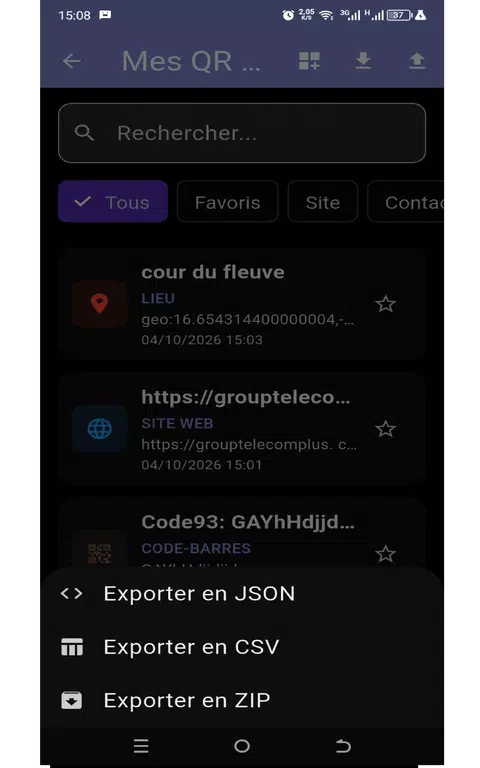
Yes. QR Scanner Pro supports exporting scan history/results to CSV (for Excel), JSON (developer-friendly), and PDF (for printing). It also supports quick copy/share actions.
What permissions does QR Scanner Pro need?
To scan codes in real time, it needs camera access. The official content also emphasizes privacy (no personal data collected and no data sent to the developer’s servers), with scan history stored only on the device.
How does QR Scanner Pro handle privacy and data collection?
The official description states: no personal data is collected, no data is sent to the developer’s servers, scan history is stored only on the device, and network connections (when used) are secured via HTTPS (TLS 1.2+).
Which Android versions and languages are supported?
The official content states compatibility with Android 7.0+ and multilingual support including French, English, Spanish, German, Italian, Portuguese, Dutch, and Arabic (language can be changed inside the app).
Start your free trial for QR Scanner Pro today!
Enjoy your everyday with QR Scanner Pro.
Let's keep in touch!
Subscribe to our newsletter for the latest news and updates.
By subscribing, you agree to QR Scanner Pro Privacy Policy.